Mobile Devices as Part of More Effective Guidance for Distributed Groups
Studying, and especially the learning of practical skills, is rapidly becoming independent of time and place. Courses are completed at one’s own pace and often in a distributed manner, for example through a hybrid model or alongside work internships.
These learning situations often require the kind of flexibility that greater use of mobile devices can provide. Mobile technology is an interesting tool in learning because it adds new features to the toolbox of both learners and instructors. It offers working methods that paper and pen – or even computers – cannot easily accommodate. On the other hand, the mobile usability of learning environments and their use in teaching are still in their infancy.
In this article, we explain how educational technology optimized for mobile devices supports learning tracking, and how the Workseed platform helps to get 100% out of the features of smartphones.
How does mobile usability in a learning environment benefit vocational education?
The reputation of pedagogical web applications regarding mobile usability has generally not been particularly flattering. Most online learning environments and other web applications on the market have often been implemented with aging web technologies that cannot take advantage of the features offered by modern web browsers, nor do they often scale smoothly across different screen sizes. The applications remain underutilized, or at least their users are dissatisfied with them.
That is why mobile usability is an important factor when choosing a learning environment. A platform that uses outdated technology cannot fully leverage the capabilities of mobile devices. Your organization’s interest in mobile should be considered when selecting the system.
The Workseed learning environment stands out positively in the market. The platform’s user interface has been built to be mobile-friendly from the ground up. Tracking studies, writing reports, and using the camera and microphone of mobile devices to create work samples on the go make workplace learning flexible.
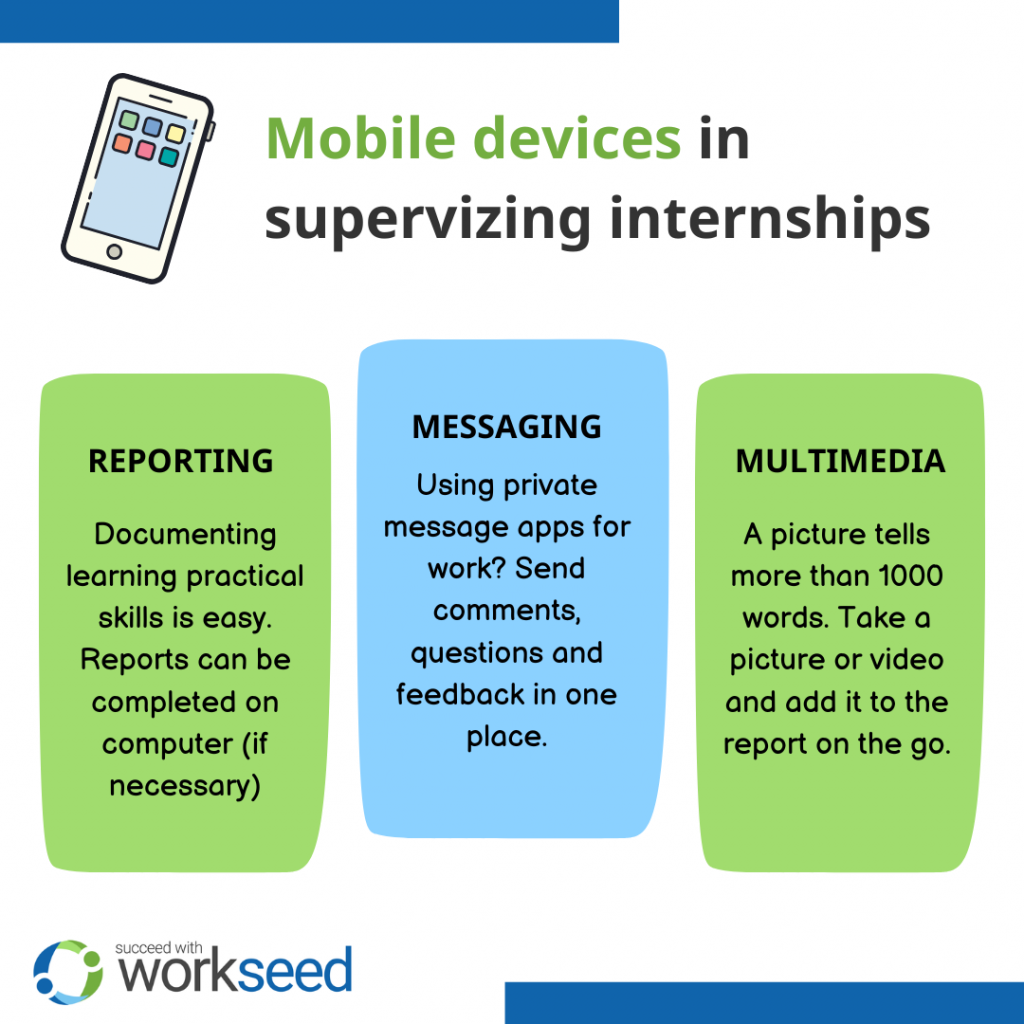
1. The barrier to reporting is lower
Vocational education also includes a lot of distributed learning at work and internship sites. In these situations, a significant part of learning takes place outside the classroom, out in the field, in the middle of work, or otherwise in challenging conditions – such as a kitchen, garage, workshop, outdoors, a vehicle, or a laboratory.
In these situations, reporting work samples, documenting assignments, doing self-assessments, and tracking progress are much easier done on a mobile device within the learning environment while working. If needed, a report started on a mobile device can be edited and finalized later on a computer.
Work samples can be checked off immediately on a mobile device. At the end of the workday, there is no need to sit down at a computer to write up the results of the work – or, in the worst case, transfer photos and videos taken with a phone to a primary device.
When documenting work is easy, students are more likely to do it well.
2. Guidance and communication are more agile within the learning environment
The same flexibility applies to the teacher as well. A well-implemented mobile tool offers a fast and handy way to keep track of students’ progress and communicate more agilely with both students and other parties monitoring their work.
Especially in vocational basic education, continuous WhatsApp messages and a chaotic jungle of emails are familiar to many teachers. When all communication related to workplace learning is brought onto the same platform, the teacher’s work also becomes easier.
Mobile devices also open up opportunities for agile communication, collaboration, and information acquisition. The ability for students to search for additional information anywhere, coordinate group work with other students, and even share relevant materials with the group is multiplied with the right mobile solution.
3. Multimedia takes the user experience to a new level
An important use case for mobile devices is their built-in support for multimedia. The camera, microphone, and the software already on the device for quickly editing multimedia before sending make documenting work extremely easy on a mobile device.
When work samples can be enriched with images, audio, and video, everyone benefits. The teacher gets a better picture of the work, and students can better illustrate what they are doing. In many fields of study, multimedia is more appropriate than written reporting.
The flexibility of mobile devices also engages students. For example, we have noticed that agile reporting supports the giving of honest feedback and that video reports make everyday life easier for students with dyslexia.
We also have encouraging precedents of reports that show pride in the traces of one’s own work. For example, construction students are very easily inspired to document their work.
4. Guide regardless of the learning environment platform
When using students’ and workplace supervisors’ own devices, there are no guarantees about operating systems or system updates. The use of devices from different manufacturers and different device generations can pose challenges for information systems.
Therefore, Workseed is available on mobile devices as a web application. This is an advantage for users because the platform works reliably on all students’ own devices, regardless of model or operating system. Students also do not need to use storage space by installing an app; the platform works directly from the cloud.
How have our customers used mobile devices to guide internships?
The Workseed platform has been piloted, for example, at Lahti University of Applied Sciences in the Business and Tourism education programs, within an English and communication course. Traditionally, the course has been implemented using a more traditional learning platform that mainly supports use on a computer. The solution was barely usable on mobile devices.
The solution in use proved impractical in certain respects. Particularly negative feedback was given to assignments that had to be submitted in video format. These assignments were central to the module aimed at developing oral communication skills, but their technical implementation was questionable.
On the Workseed platform, the course was implemented as an online course, the elements of which consisted especially of projects related to speech and presentation techniques, submitted as video assignments.
After the pilot, feedback was collected from participants. The pilot revealed the following benefits:
- Student activity improved. Staff reported that students were more active and engaged in producing video reports during the course compared to previous implementations.
- The teacher’s work was more efficient. Tracking the progress of studies through the learning platform has been designed to be easy to perceive and manage. The course teacher experienced a lighter administrative workload compared to the previously used platform.
- The user interface was considered appropriate. According to students’ experiences, the platform’s appearance and usability were on point.
How does Workseed work on mobile?
Why exactly is Workseed an interesting tool on mobile?
Because for years we have been listening to customer wishes, especially regarding mobile use. Mobile usability has been the guiding principle of our product development from the very beginning of our operations.
In the same way, a teacher can view student progress, approve work samples, and communicate with the internship site just as effortlessly on mobile devices as on a computer. A work sample can also be approved while driving to students’ workplace learning sites.
Do you sometimes feel that reporting work samples could be made easier? Or that communicating with students training in dozens of different workplaces takes too much time?
If so, schedule a demo meeting with our experts, and we will assess how a flexibly manageable learning platform could support your specific activities.
Or, if you are already considering a learning platform for your organization, check out our article on the 10 criteria for choosing the right tool for you.